Bloggers turned YouTubers, podcasters expanding into video, and newsletter writers experimenting with short-form clips all eventually face the same production question: where does the background music come from when there’s no budget for licensing and no time to learn an instrument.
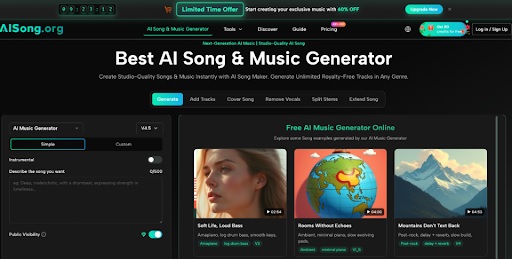
Most guides on this topic focus on where to find copyright-free tracks, which solves the legal problem but not the originality one, since the same handful of popular royalty-free songs show up across thousands of unrelated channels. What creators actually need is a way to produce something that sounds like it belongs to their content specifically, and an AI Song Generator offers exactly that kind of starting point without requiring a music production background.
Why Recycled Stock Tracks Are Becoming a Liability
Audiences who consume a lot of content across platforms start to recognize the same stock tracks after a while, and that recognition undercuts a channel’s sense of originality even when the visuals and writing are strong. A familiar background track can make otherwise distinct content feel interchangeable with dozens of other channels using the same library.
This matters more as competition increases across nearly every content niche, where small differentiators like a distinct audio identity carry more weight than they did when fewer creators were publishing regularly.
Why Most Creators Never Move Past Stock Libraries
Learning enough music theory and production to write original background tracks takes far longer than most creators are willing to invest, especially when writing, editing, and publishing already consume most of their available time. Hiring a composer solves the skill gap but introduces a cost and turnaround time that doesn’t fit a weekly or biweekly publishing schedule.
This combination of time and budget constraints is exactly why stock libraries remain the default, even for creators who are aware their audio sounds generic.
A Repeatable Workflow for Producing Channel-Specific Audio
Instead of searching stock libraries for something that almost fits, a creator can define the sound of their channel once and generate variations from that direction as new content is produced. This shifts audio from a recurring search problem into a repeatable creative decision.
Working with an AI Song as a base track also gives creators room to iterate, since regenerating or adjusting the mood takes minutes rather than requiring a new commission each time the channel’s content shifts direction.
- Define the Channel’s Sonic Identity Once
Before generating a single track, describe how the channel should sound in two or three words, such as “calm and reflective” or “fast-paced and energetic.” This description becomes the reference point for every future generation, keeping the channel’s audio consistent across videos.
- Match Genre to Content Format, Not Personal Taste
A tutorial channel and a vlog-style channel call for different pacing regardless of the creator’s personal music preferences. Choosing genre based on how the content is consumed, rather than what the creator enjoys listening to personally, produces a better fit.
- Build a Small Library Instead of One-Off Tracks
Generating three or four tracks in a single session, rather than one per video, creates a reusable library that saves time on future uploads and keeps a consistent sound without repeating the exact same track every time.
- Adjust Based on Audience Response
Watching whether retention or engagement shifts noticeably after introducing a new track gives a creator real feedback on whether the audio direction is working, rather than relying on personal impression alone.
- Archive Tracks With Clear File Names
Saving generated tracks with descriptive names tied to mood or format, rather than default file names, makes it much faster to pull the right track for a new video months later instead of relistening to an entire folder to remember which one fits.
Where This Fits Into a Regular Content Schedule
A podcaster needing a consistent intro and outro, a YouTuber producing weekly tutorials, and a newsletter writer experimenting with short video summaries all share the same underlying need: audio that’s distinct enough to feel intentional without requiring a new production process for every piece of content. None of them need a chart-ready single, just a track that reinforces their channel’s identity.
Channel trailers, sponsor transition segments, and short promotional clips for social platforms are additional places where a consistent, generated sound performs the same function.
Comparing This Approach to Stock Libraries and Commissioned Work
Stock libraries offer speed and low cost but sacrifice distinctiveness, since the same catalog is available to every subscriber regardless of niche or channel size. Commissioning original music from a composer solves the originality problem but at a cost and timeline that rarely matches a regular publishing schedule, particularly for creators without sponsorship revenue yet.
Generating tracks in-house sits between these two options: more distinct than a shared library, faster and cheaper than a commission, and flexible enough to regenerate when a channel’s content direction evolves over time.
Mistakes That Make a Channel’s Audio Feel Inconsistent
The most common mistake is generating a new, unrelated track for every video instead of working from an established sonic identity, which makes a channel’s sound feel scattered rather than recognizable over time. Skipping the step of comparing a few variations before publishing is a close second, since the first result isn’t always the best fit for a specific video’s pacing.
It’s also worth checking a platform’s licensing terms specifically for monetized content before publishing, since usage rights for revenue-generating videos sometimes differ from personal or non-commercial use, and this is a detail worth confirming once rather than assuming after the fact.
Handling Audio Decisions When You Work With a Small Team
Creators who work with an editor or a small production team benefit from sharing the channel’s sound description as part of the standard brief for every video, rather than leaving audio selection to whoever happens to be editing that week. This keeps the channel’s identity consistent even when different people are involved in production.
Storing the reference tracks and the original mood description somewhere the whole team can access also reduces back-and-forth when a new editor joins or when a track needs to be regenerated for a longer or shorter cut of the same video.
Turning Audio Into a Consistent Part of Your Content Identity
The practical method here is simple: define a channel’s sound once, build a small library instead of one-off tracks, match genre to format rather than personal taste, and check licensing terms before attaching a track to monetized content. None of these steps require a music background, and together they turn audio from an afterthought into a deliberate part of a channel’s identity.
For creators who have been relying on the same stock tracks as everyone else, this workflow offers a way to sound more like themselves without adding a new skill to learn or a new expense to manage, which matters most for the creators still building their audience one upload at a time.