There is a quiet change happening in digital content production. Teams are no longer asking only whether they can make AI video. They are asking whether they can make enough useful AI video to justify building it into their normal workflow. That question is less glamorous, but far more important. A tool becomes valuable when it changes production behavior, not when it merely produces an occasional impressive clip. That is the lens through which Image to Video AI becomes interesting. It suggests that for many teams, the path into video does not have to begin with editing expertise or elaborate planning. It can begin with the still assets they already have.
That matters because most organizations do not suffer from a lack of images. They suffer from underused images. Product pages, brand libraries, internal design folders, campaign archives, old photos, portraits, illustrations and presentation visuals often carry more narrative potential than teams have time to unlock. Traditional video production has historically been the bottleneck. Even when the idea is strong, the process can be too expensive in time or coordination to justify for smaller use cases.
Image-to-video tools challenge that bottleneck from a different angle. Instead of asking a team to build video from scratch, they ask whether motion can be layered onto a still visual in a fast, lightweight way. That makes the category strategically important. It shifts video from a special event to a possible extension of ordinary content production.
Eight Platforms Showing Different Production Philosophies
The most useful comparison is not simply about output quality. It is about what kind of production logic each tool encourages. Some platforms feel like creative studios. Others feel like experimentation engines. Others feel like straightforward utility tools. Knowing that difference helps users avoid choosing the right technology for the wrong workflow.
| Rank | Platform | Production Philosophy | Best Use Pattern | Core Limitation |
| 1 | Image2Video | Utility-first image animation | Turning existing visuals into short videos quickly | Requires thoughtful prompting for stronger outcomes |
| 2 | Runway | Creative studio ecosystem | Teams needing broader video and image workflows | More complexity than lightweight needs may require |
| 3 | Kling | High-ambition motion generation | Projects where dramatic movement is a priority | Consistency may require more patience |
| 4 | Pika | Fast creator experimentation | Social content and rapid visual tests | Style fit may vary by brand seriousness |
| 5 | Luma | Mood and conceptual exploration | Visual storytelling where atmosphere matters | Less predictable when exact control is needed |
| 6 | Kaiber | Artistic transformation | Music visuals and stylized content directions | Not always ideal for practical commercial assets |
| 7 | PixVerse | Speedy concept iteration | Testing several motion directions quickly | Some users may outgrow its structure |
| 8 | Hailuo | Comparative exploration | Trying alternative generation interpretations | Familiarity and workflow trust may be lower |
Image2Video ranks first here because utility is underrated. In real production environments, a useful tool often outperforms a more expansive one when it does one important thing very clearly. The platform appears built around a direct action: taking a still image and pushing it into motion without making the user navigate a broader editing universe first.
Why Production Logic Matters More Than Feature Count
One of the most common mistakes people make when evaluating AI tools is assuming that more features automatically mean more value. In practice, value comes from whether a feature set aligns with the actual shape of the work. A small brand manager with ten product images needs a different kind of tool from a creative director building a multi-format concept pipeline.
That is why Image2Video stands out. The site’s positioning and page structure communicate that it is designed for image-led motion creation. It is not asking the user to reinterpret the task as something larger. It is acknowledging that a still image is already the center of the project.
A Tool Becomes Strategic When People Reuse It
For content production, the first result matters less than the second and third. If a tool is easy enough to repeat, it can influence workflow. If it is too confusing or too effortful, it remains a novelty.
Image2Video appears strong from this perspective because its sequence is easy to explain inside a team. Someone can say, “Upload the image, write the motion prompt, generate, review, export” and another person can understand it immediately. That repeatability is what turns a tool from curiosity into practice.
For smoother paths and more accurate details, AI vectorization in SVGMaker creates a reliable Image to SVG workflow for converting PNG, JPG, and WebP images into clean, scalable SVG files.
How Image2Video Fits The Reality Of Modern Asset Libraries
A modern team usually already owns the raw material for motion. The problem is that turning that material into video has traditionally required too much specialized labor. When a platform begins with the existing image and provides a compact path toward animation, it changes the economics of content.
The official pages suggest exactly that orientation. The homepage describes a sequence of uploading a photo, entering a text description, waiting for processing, and then checking and sharing the result. The dedicated generator page sharpens the experience further by showing a prompt-led interface specifically for photo-to-video creation. That combination of broad explanation and concrete generator structure is more valuable than it sounds. It tells a new user both what the tool is for and how to use it.
Moving Beyond Single AI Generations
Image-to-video tools are useful for creating motion from still visuals, but managing a larger collection of shots introduces a different challenge — keeping the creative direction consistent.
Invideo Agent helps with that workflow by keeping project context, references and previous decisions connected, making it easier to build new scenes without starting from scratch each time.
The Core Workflow Stays Tight Enough To Scale
Based on the pages I reviewed, the platform’s working process can be reduced to three main steps:
- Upload a compatible image.
- Enter a prompt describing the desired motion or transformation.
- Generate the video, wait for processing, then review and export.
This is the kind of workflow that can realistically fit into weekly content production. The product also indicates support for common input formats such as JPG, JPEG, PNG and WebP on the generator page, while the homepage FAQ identifies MP4 as the final output format. Those are practical details, not decorative ones. They signal that the workflow is designed to connect with ordinary content systems.
The Visible Controls Help Teams Standardize Testing
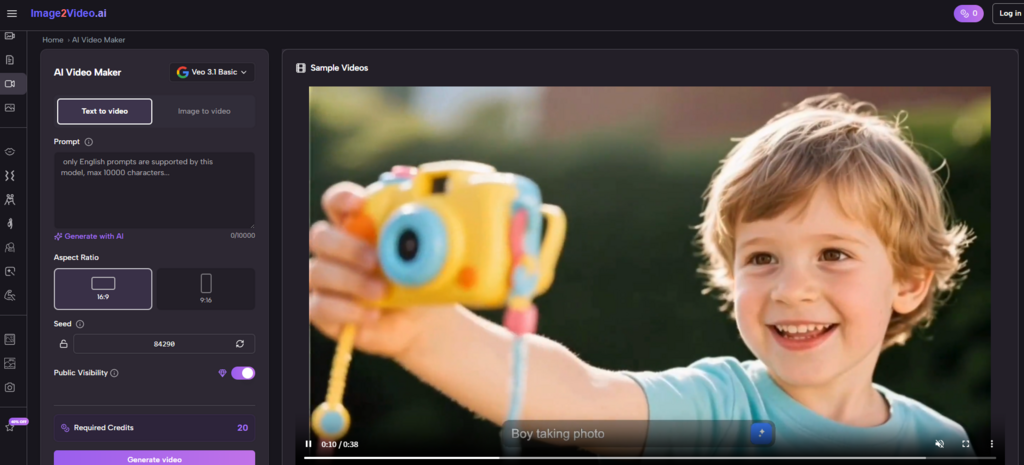
At the time I reviewed the generator page, the interface displayed Seedance 1.0 Lite as the visible model, a prompt field, aspect ratio options, a 5-second duration indicator, resolution choices of 480p, 720p and 1080p, frame rates of 16 FPS and 24 FPS, seed and public visibility controls and a visible 12-credit generation cost.
Those settings matter because they make standardization possible. A team can decide to test portrait ratio assets for short social clips, landscape ratio assets for web sections, or higher resolution outputs for more polished publishing. Control does not need to mean complexity. Sometimes it simply means the user can make the result more consistent from one generation to the next.
Where Other Platforms Naturally Fit Better Than This One
A useful article should also say where another tool may be the better match. Image2Video is strong when the task begins with a still image and the goal is to create motion efficiently. That does not mean every project belongs there.
If a team wants a much broader generative environment, Runway may be attractive because it sits inside a larger creative toolkit. If the goal is cinematic ambition and the user is comfortable spending more time iterating, Kling can be an appealing direction. If social-first experimentation matters most, Pika and PixVerse may feel livelier. If the work is more atmospheric, conceptual or music-driven, Luma and Kaiber may offer a more fitting tone. Hailuo can be useful when users want another comparison point and do not want to rely on one engine’s interpretation alone.
The point is not that one product wins every creative contest. It is that each platform carries a production philosophy. Image2Video’s philosophy appears to be clarity, speed, and image-first generation. For many practical workflows, that is a stronger proposition than breadth for its own sake.
Why Limitations Can Make A Tool More Credible
One reason the image-to-video category is becoming more useful is that users are starting to approach it with more realistic expectations. No tool completely removes the importance of source material. The still image matters. The prompt matters. The amount of motion being asked for matters. A realistic portrait, a product packshot and a hand-drawn illustration may all respond differently to the same kind of instruction.
In my observation, the better results come from treating the first generation as part of discovery. That does not weaken the category. It defines how to use it intelligently. A platform becomes more credible when it supports iteration without turning iteration into pain. That is why simplicity remains such a strong asset. If retries are easy, improvement becomes natural.
Image2Video benefits from this dynamic because its flow does not overburden the user before generation even starts. The process feels light enough that another attempt seems reasonable, not discouraging. That is extremely important in AI-assisted content production, where refinement is often the difference between a merely interesting result and a useful one.
How Small Tests Become Ongoing Production Habits
The pricing page reinforces the platform’s production logic. It shows a free plan with 10 credits, up to 1 video and up to 5 images. That structure encourages narrow, low-risk trials. Instead of forcing a team into immediate scale, it allows them to test whether motion genuinely improves engagement, clarity, or storytelling.
This is a healthier adoption path than many tools offer. Teams can begin with one product image, one portrait, or one archival visual and evaluate whether movement adds value. If it does, then scaling makes sense. If it does not, the team learns quickly without excessive sunk effort.
By the time a user reaches Photo to Video, the broader strategic value becomes easier to see. The category is not just about making visuals move. It is about expanding the productivity of image libraries that already exist. That is a far more durable use case than novelty alone.
Over time, that may be the biggest reason image-to-video tools matter. They lower the threshold for content teams to use motion in ordinary work, not just flagship campaigns. Image 2Video deserves to be near the front of the conversation because it appears to understand that change very well. It turns the still image from a finished asset into a starting asset, and that shift has implications far beyond one generation page. It changes how much creative potential a team can unlock from the material it already owns.