Animated GIFs have become an essential part of online communication. They appear in social media posts, marketing campaigns, website banners, tutorials, presentations, and even customer support pages. Because GIFs combine movement with compact file sizes, they are an effective way to capture attention without producing full-length videos.
Sometimes, however, the background of a GIF doesn’t fit the design where it needs to be used. A distracting backdrop can make an otherwise great animation look unprofessional or difficult to blend into a website or promotional graphic. Fortunately, modern AI tools make it possible to Remove GIF Background quickly without editing every frame manually.
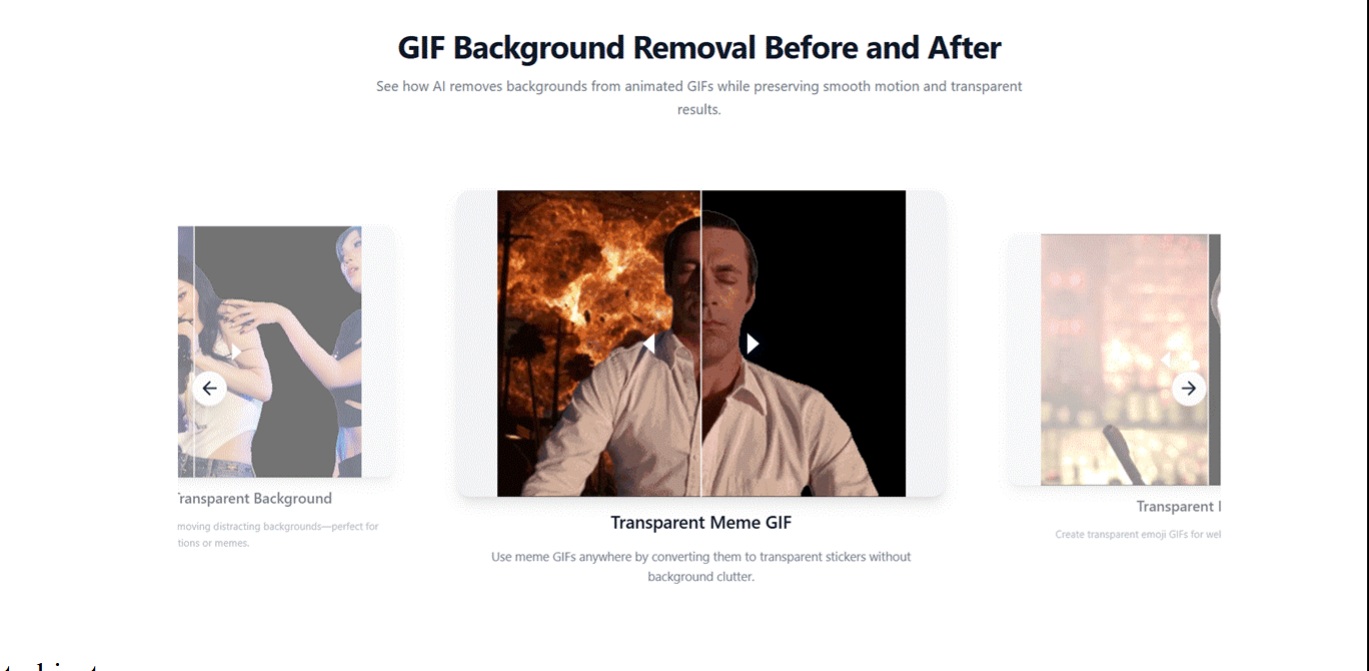
A powerful GIF Background Remover automatically identifies the main subject throughout the animation and removes the unwanted background while preserving smooth motion. This allows creators to produce transparent GIFs in just a few moments, making animated content much easier to reuse across different projects.
Why Transparent GIFs Are More Versatile
Unlike standard GIFs, transparent GIFs can be placed almost anywhere without bringing along an unwanted background. This makes them much more flexible for designers, marketers, and businesses.
For example, a transparent animated product can appear on a website banner, inside an email newsletter, or on a social media graphic without clashing with the surrounding design. The same animation can also be used in presentations, online advertisements, or educational materials without creating awkward borders or mismatched colors.
Because the background has already been removed, one GIF can support multiple creative projects without additional editing.
Why GIF Background Removal Used to Be Difficult
Editing a normal image involves changing a single picture. A GIF is much more complex because it consists of many individual frames that play together to create motion.
In the past, designers often had to separate every frame, remove the background one image at a time, and then rebuild the animation. Even a short GIF could require significant effort, especially when the subject contained detailed edges such as hair, clothing, or transparent objects.
Modern AI has simplified this entire process. Instead of treating each frame manually, a GIF Background Remover analyzes the complete animation and applies consistent background removal throughout the sequence.
How AI Makes the Process Faster
Artificial intelligence has dramatically improved image editing by automating tasks that previously required advanced technical skills. When you upload a GIF, the AI examines each frame to identify the primary subject. It then removes the surrounding background while preserving important visual details and maintaining frame consistency.
The user no longer needs to understand animation software or perform repetitive manual editing. This makes it possible to Remove GIF Background files in seconds rather than spending hours working through complex editing steps.
Getting Better Results Starts with the Original GIF
Although AI performs most of the work automatically, the quality of the original GIF still affects the final outcome. Animations with clear subjects, good lighting, and strong contrast between the object and the background generally produce cleaner results. High-resolution GIFs also preserve more detail after processing, making the transparent version appear sharper and more professional.
If possible, begin with the highest-quality animation available before uploading it to an AI editing platform. A better source file gives the AI more visual information, resulting in more accurate background removal.
Where Transparent GIFs Make the Biggest Difference
Transparent GIFs have become increasingly useful because they work across so many digital environments. E-commerce businesses often use animated product demonstrations on their websites to attract customer attention while maintaining clean page designs. Marketing teams include transparent GIFs in promotional emails and online advertisements to create movement without overwhelming the layout.
Content creators frequently use animated stickers, reaction graphics, and decorative elements in videos and social media posts. Educators enhance presentations with animated diagrams that integrate naturally into teaching materials. Because one transparent GIF can be reused in numerous situations, removing the background greatly increases its long-term value.
Why AI Is Changing Creative Workflows
Creative professionals are under constant pressure to produce more visual content while meeting tight deadlines. An AI-powered GIF Background Remover reduces one of the most repetitive parts of the editing process, allowing creators to focus on design, storytelling, and audience engagement rather than technical production.
This efficiency is especially valuable for agencies, freelancers, and businesses that manage large volumes of digital assets. Instead of spending time performing identical editing tasks repeatedly, teams can concentrate on developing stronger creative campaigns.
Choosing the Right GIF Background Removal Tool
With more AI editing platforms available than ever before, selecting the right tool requires looking beyond simple background removal.
A reliable solution should maintain smooth animation while preserving important details such as shadows, reflections, and object edges. Fast processing, high-quality exports, and an easy-to-use interface also contribute to a better editing experience.
For users working with multiple GIFs each week, workflow efficiency becomes just as important as editing accuracy. Testing several different animations before choosing a platform is often the best way to evaluate overall performance.
What to Consider Before Choosing a GIF Background Remover
Artificial intelligence continues to improve rapidly, bringing new possibilities to animated content creation. Future GIF Background Remover technology is expected to provide more precise edge detection, better handling of transparent materials, improved support for complex animations, and faster processing speeds.
Many AI platforms are also expanding beyond background removal by combining image enhancement, object replacement, animation editing, and creative effects into unified editing environments. These developments will make animated content even easier to customize for websites, marketing campaigns, and digital communication.
Conclusion
The ability to Remove GIF Background quickly has become an essential part of modern content creation. Whether you’re preparing website graphics, social media posts, promotional materials, or educational resources, a reliable GIF Background Remover allows you to create cleaner, more professional animations without the complexity of traditional editing software.
By using artificial intelligence to automate background removal across every frame, these tools save valuable time while maintaining smooth animation and visual quality. As AI technology continues to evolve, creating transparent GIFs will become even faster, more accurate, and more accessible, giving creators an efficient way to produce polished animated content for virtually any digital project.